How We Built the Path to Hope Stream Control Room (Part 3: Ancillary Software and Custom Tools)
2026-05-06 (Part 1 | Part 2 | Part 3)
A technical tour of the ancillary software and custom tools used for the Path to Hope stream.
If you have not read how we kept Path to Hope online for 14 days, you should probably start there. This is the final part of a three-part technical deep-dive series. Part 1 covers the cloud-provider saga and our OBS setup. Part 2 discusses how we managed audio and latency. This post covers the map overlays, the source rotator, the donation trackers, and the custom code that more or less held everything together with manners.
The Map: Real-Time Location, Speed, and Weather
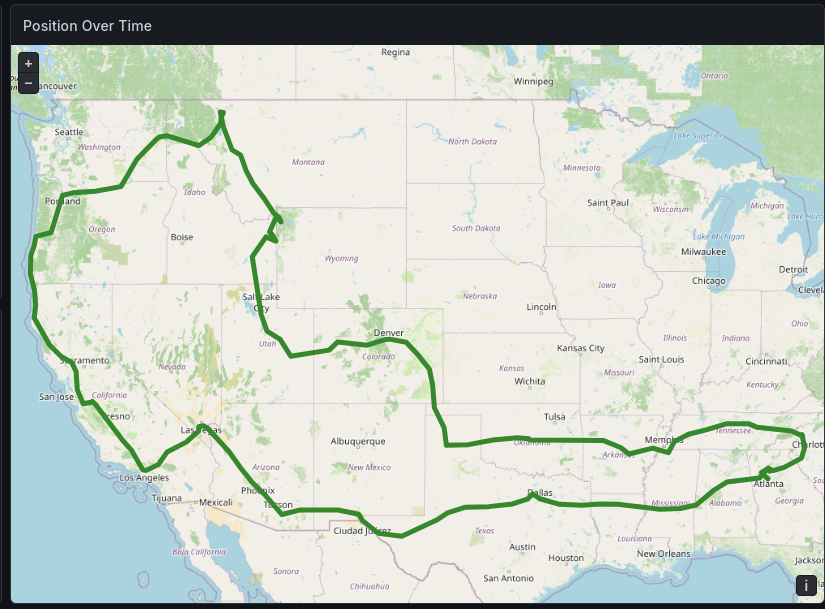
The map overlay was one of the most visually distinctive parts of the stream. Viewers could see exactly where the truck was, how fast it was going, the current weather, and how far the streamers had traveled. Mage could not find an off-the-shelf package that did everything we wanted, so he did what any software engineer with a deadline and poor impulse control would do. He wrote the Mage Map Tracker.
The system worked like this: a GPS tracking app on a phone in the truck sent location updates to the Mage Map Tracker server. The server stored the data, performed reverse geocoding to determine city and state names, and computed statistics like speed, bearing, and odometer distance. OBS Studio rendered the current position on a map using a browser source, and a custom application updated the bottom bar on the stream with the latest information.
Overland
The first step of map tracking is to transmit the real-time position of the streamer to the server. For this, we used the free Overland GPS app on iOS. This application transmits position, speed, and elevation in a consistent format to a configurable server. As long as the streamer's phone had internet connectivity, Overland could transmit real-time updates to the server.
If you watched the stream, you probably heard occasional reminders from the control room telling the streamers to start (or restart) Overland. When they forgot, the map position stopped updating and the speed dropped to 0 MPH. There was also one memorable occasion when location access for Overland had been disabled, causing it to report coordinates of 0,0, a spot in the Atlantic Ocean off the coast of western Africa known as "Null Island." Not our intended route.
Mapbox
Displaying a live map on a charity stream is not exactly a mainstream use case. There are plenty of map data providers, but most are optimized for business websites or mobile apps. Their usual customers are helping you track the plumber on the way to your house or the package on the way to your porch, not a pickup truck barreling toward another Waffle House.
We reached out to several providers to ask about using their service on our charity stream. Some did not respond at all. Others were very interested in quoting us a license agreement. Mapbox was the only one that responded enthusiastically and gave us the green light to use the free tier during the stream. We made sure to follow their attribution requirements, which is why our "crawl" at the bottom of the screen never covered the bottom of the map. The Mapbox logo and copyright notices always remained visible. We were more than happy to give credit where credit was due.
Each map is a collection of square images called tiles, and services like Mapbox charge for the number of tiles served. Since much of the driving was on interstate highways, we set the zoom level to show a fairly wide area, giving viewers a broader sense of where the truck was headed. At that zoom level, even for a 7,500-mile road trip, we only needed to request about 2,000 tiles.
Once again, thank you, Mapbox.
OBS Map Bridge
The map was only half the story. We also needed to get all that location data, speed, locality, region, elevation, weather, distance, to appear in the bottom bar of OBS. For that, Mage built the OBS Map Bridge, a companion Go program that connected to the Mage Map Tracker server and pushed updates into OBS via its WebSocket API.
The bridge was driven by rules defined in a YAML file. Each rule supported both conditions and actions. For example, when speed was above 5 mph and GPS data was available, the bridge would update the "SpeedText" source in OBS with the current speed. When the locality changed, it would update the "LocationText" source. The bridge also handled bearing rotation for a compass overlay, weather updates, altitude displays, and even motion detection, hiding the speedometer when the truck had been stationary for more than a minute.
The bridge ran locally on Bygul, consuming events from the Mage Map Tracker server and updating OBS sources in real time. We intentionally added five seconds of delay to both the map itself and the bridge outputs, helping to line up the display data with what viewers were seeing from the truck's higher-latency camera feed.
Easter Eggs, or Possibly Breakfast Traps
For the "convenience" of the streamers, we added each Waffle House to the map as a point of interest. Chat naturally interpreted this as a binding recommendation, and it worked. We were treated to two live-streamed breakfasts.
Waffle House, feel free to reach out if you want to be a 2027 Path to Hope sponsor!
The General Dab
Anyone in the RISK community will recognize the "General Dab" emote, which players send when they have 69 troops on a territory. Our friends at SMG Studio have been supportive of Fighting for Freya since the beginning, and they cheerfully authorized us to use the image and sound of this unmistakable animation. It appeared over the map when the truck's speed held steady at 69 mph for ten seconds or longer.
The Source Rotator: Dynamic Distance and Destination
One of the finer details of the bottom bar was the distance-and-destination display. To avoid answering the same question over and over, we gave the streamers a way to specify their destination so it could appear in the bottom bar. But showing that continuously alongside everything else would have made the display too busy, so we rotated it in with the distance information instead.
For this, we used OBS Source Rotator, a custom utility that Mage had built for his own stream. Source Rotator connects to OBS via WebSocket and cycles through scene items on a configurable schedule, with conditions that determine which items are visible at any given time. You could technically do this with Firebot or Advanced Scene Switcher, but the sheer number of sources to show and hide would have turned an already complicated setup into a small administrative crime, especially after we stopped using nested scenes.
The mi/km toggle worked similarly. We had paired text sources for each distance: one in miles, one in kilometers. Source Rotator could show one and hide the other based on a configuration flag. If chat started demanding metric units, a single API call flipped the display for every distance on screen. This approach extended to the temperature display (Fahrenheit/Celsius), the elevation (feet/meters), and the speedometer (mph/kph).
Source Rotator also supports scene rules, which pause or resume rotation based on the active OBS scene. During the "AFK" overnight scene, we did not want the distance display rotating through destinations. We wanted it static or hidden. Scene rules handled that automatically. When the stream switched back to the main driving scene, rotation resumed.
Firebot: Donations, Alerts, and the AFK Timer
While the map and distance displays were powered by custom software, the on-screen alerts, donations, follows, subscriptions, and channel point redeems, were managed by Firebot, a free and open-source stream bot. Firebot handled the visual layer of community interaction, and it handled it well.
Donation Alerts
Firebot was configured to trigger donation alerts as an overlay in OBS. The alert box was designed by Roamin Nomad's wife to match the stream's visual theme. When someone donated to Fighting for Freya, a cheerful alert would slide onto the screen, announce the amount, and play a sound. It was simple, effective, and genuinely heartwarming to watch. Exeldro's Move Transition plugin animated the alert from the center of the screen to the upper right, then whisked it away again.
Firebot also kept a counter of the total donations received during the stream, displayed in the bottom bar. It updated automatically when a donation came in and could also be adjusted manually by an administrator to account for donations received outside Twitch, such as through the Fighting for Freya website.
The AFK Message and Timer
When Nordic Noob and Roamin Nomad went to bed, the stream switched to an "AFK" scene. This scene showed a slideshow of Freya and her cats, played music, and displayed a timer indicating when the streamers were planning to return. Firebot managed the AFK timer as a text overlay that incremented every second.
The AFK scene also displayed a message with the current status, e.g. "Eating dinner" or "See you tomorrow for the cold plunge." We created a command in Firebot so that the streamers could edit this message on the fly without touching OBS.
Community Redeem Tracker
One of the more creative Firebot setups was the community redeem tracker. Viewers could spend their cure coins on various interactions: the streamers get a tattoo, chat chooses Roamin's haircut, cold plunge, Noob dances with his shirt off, and so on. Firebot tracked these redeems and updated an overlay showing recent community activity. It gave viewers a sense of participation and made the stream feel less like a broadcast and more like a shared adventure with occasional regrettable decision-making.
Camera Switcher
Firebot also integrated with our custom camera-switching middleware. When a viewer redeemed cure coins to switch the camera angle (or an administrator changed it because the streamers forgot), Firebot received the Twitch event and triggered the ATEM switcher in the truck. The chain was: viewer redeem → Twitch chat → Firebot → VPN → OBS Source Rotator in Docker → our middleware → ATEM → camera switches → truck OBS → SRT → server OBS → Twitch → viewer sees new angle. The physical camera switch happened within about one second, but stream latency plus Twitch latency meant the viewer usually saw the result roughly ten seconds later.
Custom Plugins
Mage has written several plugins for Firebot (in addition to contributing code to the core project itself). We used the following plugins:
Firebot Deferred Action: Allows you to schedule actions to be executed after a delay or at a specific time. We used this in our audio setup to delay on-stream readout of TTS messages by about 5 seconds to synchronize things better with the latency of the truck stream.
Mage Utils: Has several utilities and custom variables, notably a formatting function for currency amounts. Some functions were added specifically for Path to Hope including mile-kilometer conversion and writing out numbers as text (e.g., $420.69 becomes "Four hundred twenty dollars and sixty-nine cents") so that TTS would read them out consistently.
OpenAI Integration: Integrates OpenAI's language models with Firebot, in our case used to filter TTS messages and actually read out those TTS messages. The stream consumed less than $4.00 of API credits for the entire trip due to efficient prompt caching.
Rate Limiter: Limits the rate at which certain actions can be triggered. We used it to grant four free TTS messages every four hours and a one-time allotment of 250 cure coins when a viewer sent their first chat message during the stream.
Music: The Soundtrack to a Road Trip
A 14-day stream without music would be nothing but engine noise and chat commentary. Nordic Noob is a subscriber to Epidemic Sound, which meant every track in the rotation was properly licensed for streaming. He was meticulous about this. Viewers occasionally made song requests for popular radio hits, but he refused to play anything that might trigger a copyright strike or put the charity stream at risk. The result was a playlist that was eclectic, occasionally obscure, and sometimes mixed in random Swedish tunes, but was completely above board. It may not have been the Billboard Top 50, but it was safe, and on a 14-day fundraiser, safe wins every time.
Nordic Noob uploaded over 1,200 songs from his Epidemic Sound library for the trip, including, because this is Nordic Noob we are talking about, a generous helping of Christmas music. The challenge was getting that music into OBS in a way that was reliable, remotely controllable, and compatible with the tools we already had.
The solution was YOMD, Your Own Music Desktop, an Electron-based desktop music player that Mage built for his own stream. YOMD plays local MP3 files and exposes a REST API and WebSocket interface that can be controlled with a Stream Deck and Firebot. It also supports playlist management, track searching, and real-time notifications.
YOMD runs as a local application but the real magic is the API. Through that API, we could query the current track, send play/pause commands, skip songs, adjust volume, and get real-time state updates. We could send a message to Advanced Scene Switcher when the song changed to update on-screen text sources accordingly. Viewers always knew the current song, and chat could run a Firebot command for the next Christmas banger without Nordic Noob taking his hands off the wheel. We also added restricted-access Twitch commands so that the streamers could play specific songs whenever they wanted, such as the trip's theme song, Every Mile for Freya.
Because YOMD plays local files rather than streaming from the internet, it was immune to the connectivity issues for the truck. The music kept playing even when the truck was in a dead zone. There is something poetic about a music player being the most reliable component of a 14-day stream, but that is what happens when you keep things simple and local.
VPN and Remote Access
Remote management, changing the camera angles, deploying the Colorado Donut Fix, required access to the truck's onboard systems. The truck had a Windows laptop running OBS, Docker Desktop, and our custom software. We needed to reach it from the server, and we needed that connection to be secure.
The solution was a VPN. Both the truck and the server connected to a private OpenVPN server, which gave us a secure tunnel regardless of what public IP addresses either side had. OpenVPN is lightweight, fast, and extremely reliable. Once the tunnel was up, the truck's laptop had a stable internal IP address that we could SSH into (well, VNC into, because Windows), and the laptop could reach the server without exposing anything to the public internet.
The VPN also enabled the camera-switching redeem. When a viewer redeemed the camera switch channel points, Firebot on the server sent a command through the VPN to the middleware running on the truck laptop. The middleware then communicated with the ATEM switcher on its own network. Without the VPN, we would have needed to expose the truck's systems to the public internet, which was not happening.
OpenVPN handled network changes gracefully. When the truck switched from Starlink to cellular or passed through a dead zone, the VPN tunnel would drop and automatically reconnect when connectivity returned. We never had to manually restart it. For a mobile setup, that kind of resilience is essential.
Monitoring and Metrics: Grafana and Prometheus
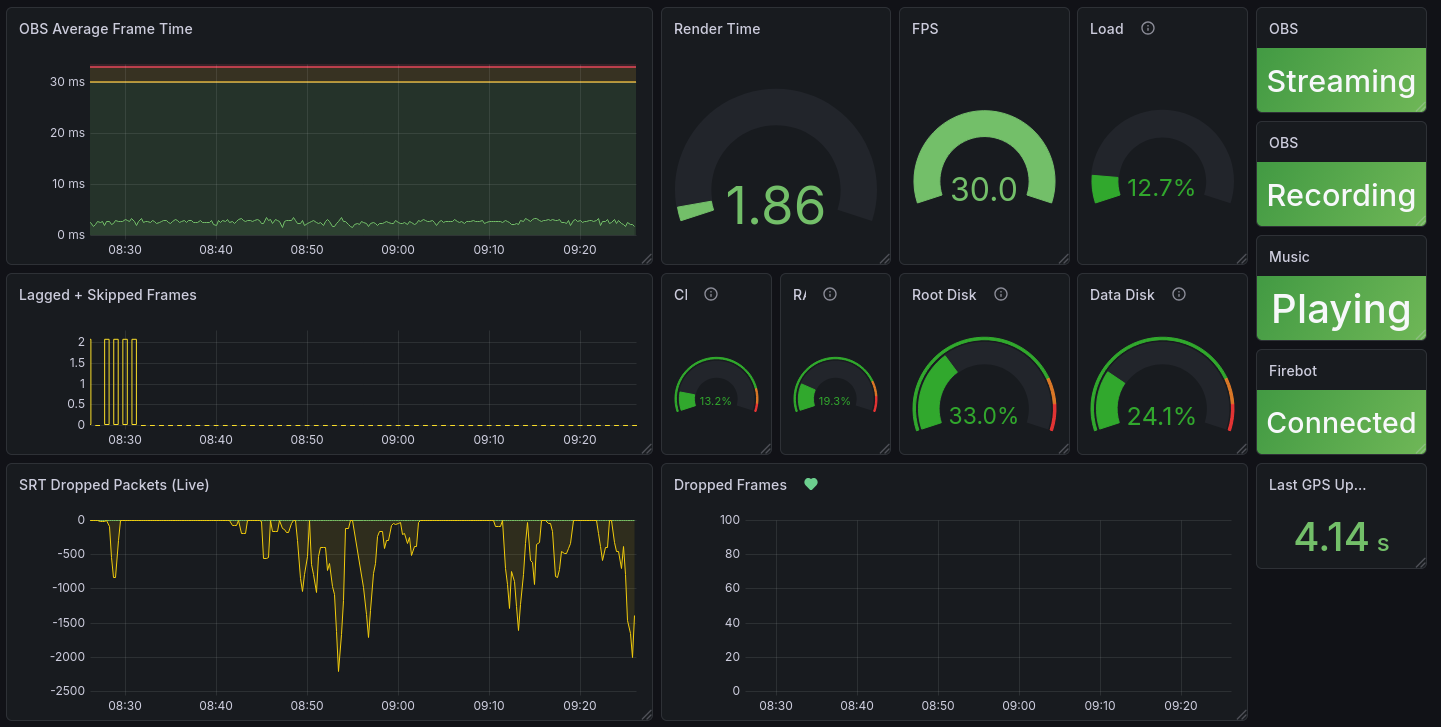
For monitoring, we used Prometheus and Grafana, two open-source projects that are widely used across the industry, including at Mage's day job. Prometheus handled metric collection and storage. Grafana turned those metrics into dashboards that let us see, at a glance, whether the stream was healthy or quietly heading toward disaster.
The basic model is straightforward: applications expose metrics over a web server, and Prometheus periodically scrapes those endpoints by making requests and recording the returned values as time series. That made it a good fit for our setup. OBS exporters, custom services, and other components could each publish their own counters and gauges, and Prometheus would pull them in on a schedule. We hosted Prometheus and Grafana on a different cloud provider from the main stream infrastructure so the monitoring stack would stay reachable even if the primary systems were having a bad day.
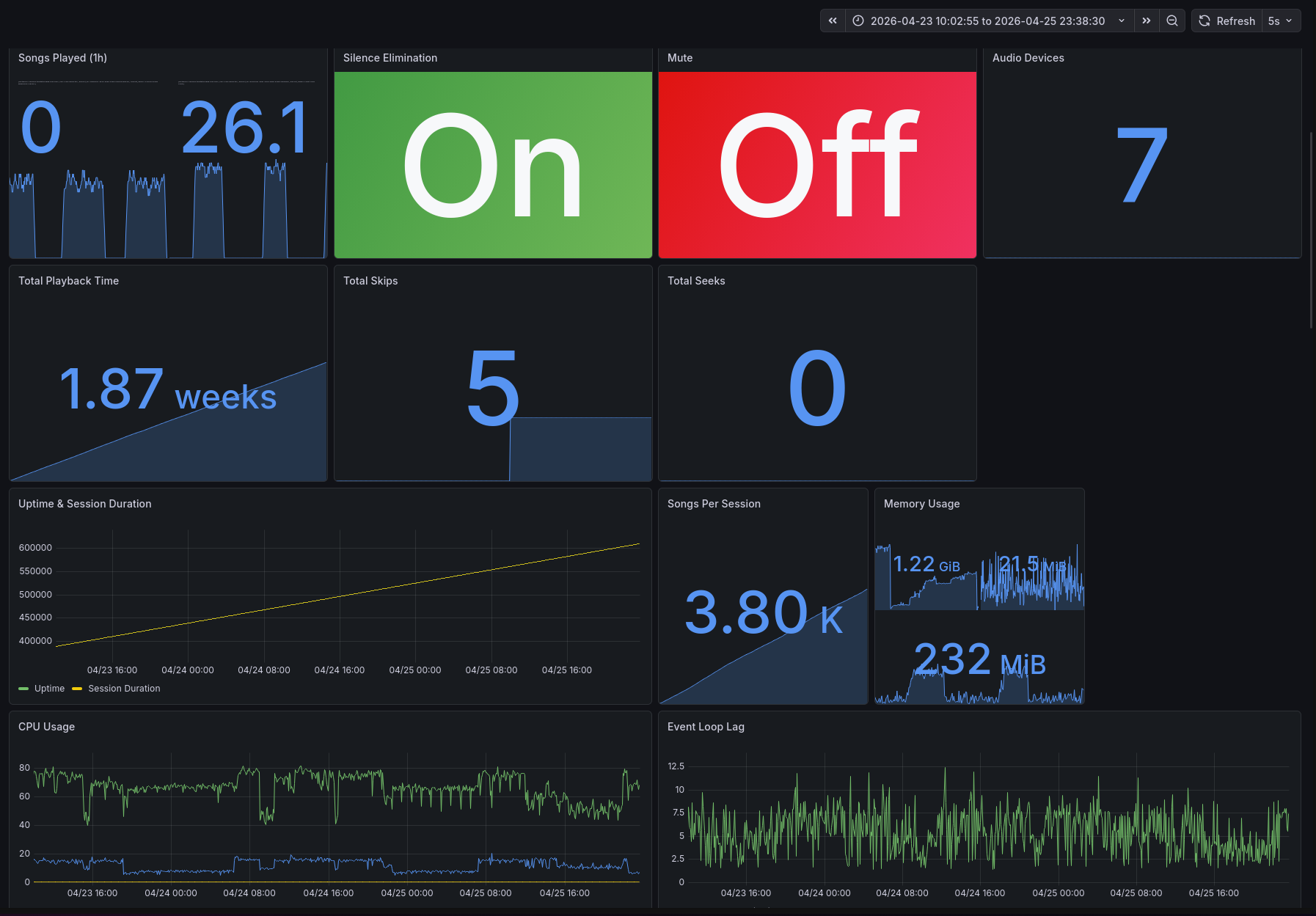
We built our own dashboards for the stream, with some AI assistance in getting panels and PromQL queries into decent shape faster. The result was a set of views tailored to this event rather than generic server monitoring. Our main dashboard pulled together the core metrics we kept checking throughout the trip: stream health, system load, connectivity, and the various signs that told us whether we could relax for thirty seconds or needed to start debugging immediately.
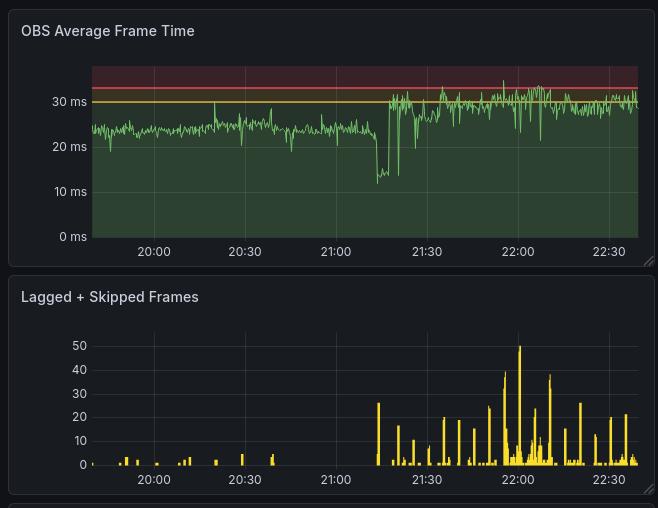
One of the most useful graphs was frame time. When OBS starts struggling, frame render time rises before viewers necessarily understand what they are seeing. In the chart below, you can see the exact moment when Trjegul started to have problems due to its "noisy neighbor." This kind of telemetry let us distinguish between "chat says the stream feels weird" and "yes, the machine is measurably falling behind right now."
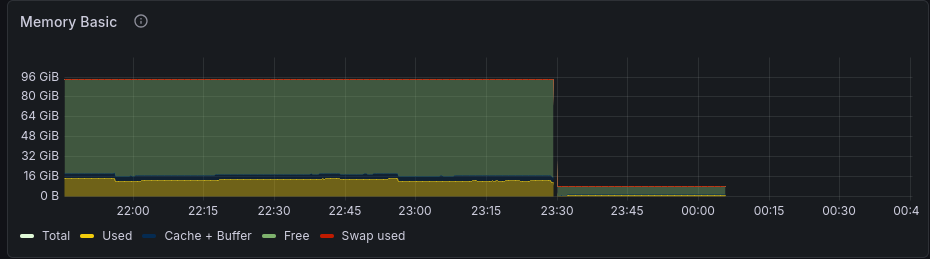
We also tracked host-level metrics like memory usage. In Trjegul's case, that turned out to be useful for a different reason: the graph clearly shows the scale-down, followed by the point where the host simply disappeared from the network. That is a grim but very informative shape. Sometimes observability is less about proving that a system is healthy and more about proving that a provider did, in fact, drop your machine into the void.
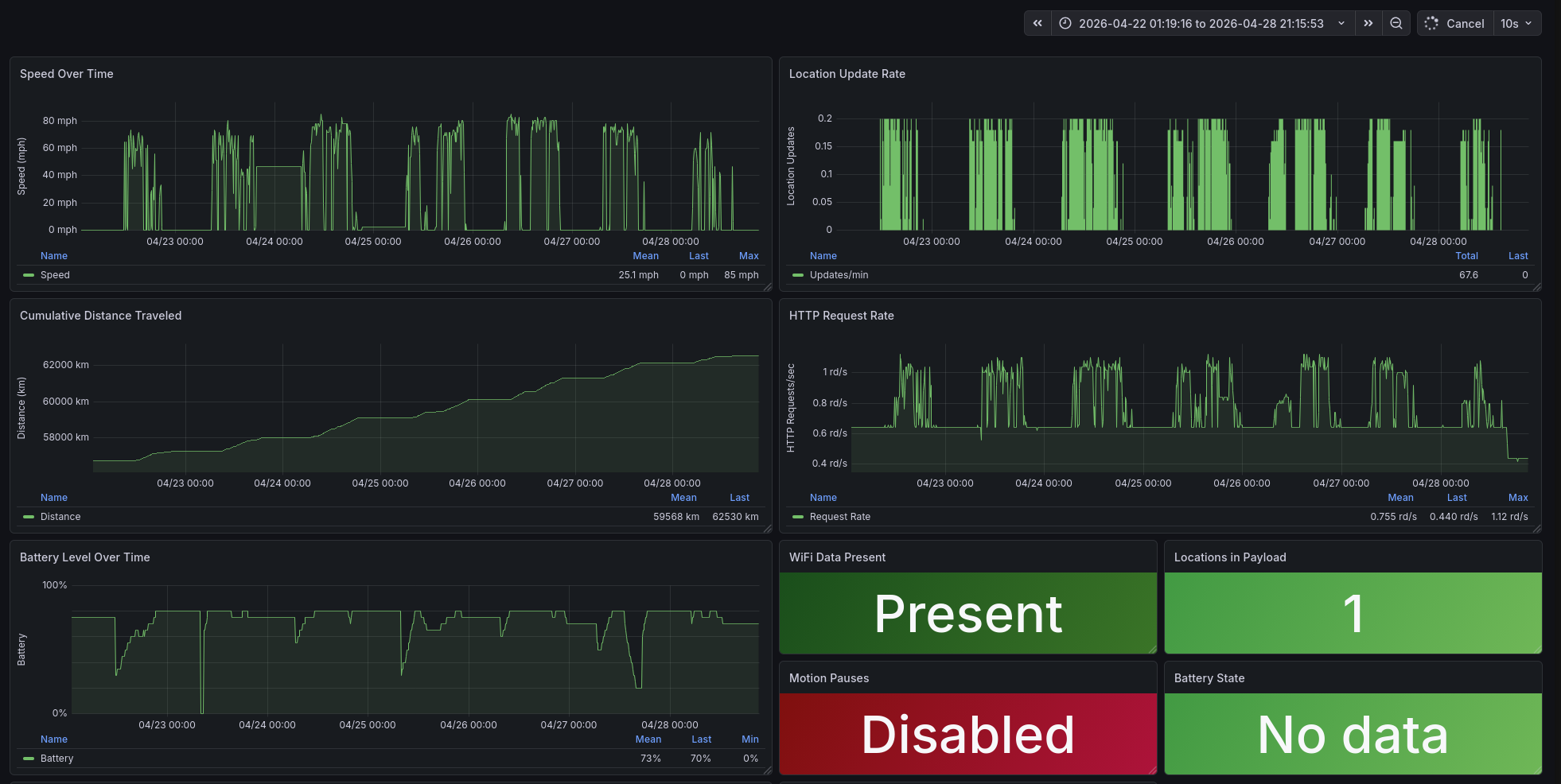
Because Prometheus is general-purpose, we were not limited to OBS or infrastructure metrics. We could also instrument event-specific systems. Even our music player exposed metrics, so we could see things like skipped songs, repeated songs, and other useful trivia about the soundtrack of the trip. The map systems had their own metrics as well, including service health and device data. One of the graphs on that dashboard was literally the battery level of Nordic Noob's phone, which is not a sentence I expected to write in a production monitoring context, but there it is.
Lessons and Takeaways
The Software We Wrote
By the numbers, the custom software stack for Path to Hope was substantial. The Mage Map Tracker server, the OBS Map Bridge, the OBS Source Rotator, and the various scripts together represented over 284,000 lines of code and tests. All of it was written in the weeks leading up to the trip, tested in private streams, and then operated under real-world conditions for fourteen days straight.
Was it over-engineered? Probably. Did every feature get used? Not even close. Did it work? Mostly. And when it did not, we fixed it live while the streamers drove through canyons, tunnels, and forests, which is not an environment typically recommended for calm debugging.
The best compliment we received was from viewers who assumed we were using some expensive, off-the-shelf broadcast solution. When we explained that the map was a custom web app, the distance display was a Go program rotating text sources, and the entire thing was running on a PC named after a mythical Norse cat, the reactions ranged from impressed to slightly concerned. Both are fair.
GStreamer Is Worth the Learning Curve
If you need to ingest unreliable network streams into OBS, invest the time to learn GStreamer. Being able to add watchdog elements, tune SRT parameters, and manage queue behavior directly transformed our stream reliability.
Decouple Wherever Possible
The decision to split the visual workload between the truck OBS and the server OBS meant that each side could focus on what it did best. The truck handled cameras and local audio. The server handled music, maps, alerts, and overlays. When the truck disconnected, the stream kept running. Decoupling is a survival strategy, not merely an architectural preference.
Remote Management Is Mandatory
Every component we built or integrated, the map tracker, the source rotator, the re-stream server, the VPN, was designed to be managed remotely. When your hardware is in a moving vehicle and you are in a basement, you cannot walk over and reboot a machine. APIs, WebSocket controls, and configuration hot-reloading are requirements, not luxuries. Even so, our VNC access to the truck OBS computer was too flaky, and we could not get RDP access because of the way a Microsoft account was configured. Before the next stream, we need to sort that out or perhaps just promote that laptop from Windows to Linux.
Observability Is Critical
Every component we built, from OBS to the server to the map tracker, was designed to be observable. When you are in school or working full time, you cannot spend 24x7 staring at the OBS stats panel like a caffeinated gargoyle. We relied on a concise one-page dashboard for overall health and Discord alerts that warned us when something looked wrong. Even so, we came away with a longer list of things we want to measure next time.
Firebot Punches Above Its Weight
For a free, open-source tool, Firebot is remarkably capable. It handled alerts, timers, redeem tracking, and overlay management without complaint. If you are streaming on Twitch, Firebot deserves a serious look.
What We Built
The Path to Hope control room was a loosely coupled federation of tools, not a single piece of software or a single server: OBS Studio for compositing, GStreamer for resilient video ingest, Mage Map Tracker for location data, OBS Source Rotator for dynamic displays, Firebot for alerts and interactions, OpenVPN for secure remote access, Grafana and Prometheus for observability, and a whole lot of Bash scripts and Go binaries filling the gaps with varying degrees of elegance and sleep deprivation.
No individual component was perfect. OBS crashed. The network dropped. The streamer inadvertently visited Null Island via a phone misconfiguration. But the system as a whole was designed to absorb those failures and keep going. When OBS crashed in the truck, the local mediamtx container kept the upstream feed alive long enough that the rest of the system did not immediately panic. When the cloud server got ripped from its rack without notice, Bygul took over. When the truck lost signal, the hamsters kept Twitch and YouTube alive. Each layer of the stack had a job, and each layer did its job well enough that the stream survived.
We would not repeat the exact same setup. Most obviously, we would skip the budget cloud host, assuming they are still in business by then. Beyond that, we would build more redundancy into the server setup, because Bygul should not have to pull the chariot alone. We would add more observability, fix remote access to the laptop, and maybe re-evaluate those OBS media sources with updated hardware. We might even write slightly fewer lines of custom code, if only because sleep remains a medically supported idea.
But, absent a major sponsor willing to kick in tens of thousands of dollars, we would absolutely build our own stack again. We did not find any commercial options near our price range that could do even half of what we achieved. There is something deeply satisfying about watching a system you built carry a message across the country, one frame, one GPS point, one donation alert at a time.